
Loan Amortization Calculator
Estimate your monthly loan payments, total interest, and full amortization schedule. Perfect for personal, auto, student, or home loans.
Use our loan amortization table calculator to view a detailed month-by-month breakdown for any loan term and amount. You can also export results directly to Excel — making this the ultimate amortization calculator for loan tracking and amortizing loan calculator excel for planning smarter payments.
USD only. Educational estimate.
Loan Amortization Calculator
Compute your monthly payment, total interest, payoff time, and detailed amortization schedule. USD only. Educational estimate.
What Is Loan Amortization?
Loan amortization is how a fixed monthly payment is split between
interest and principal over time. Early payments are mostly interest; later
payments are mostly principal. Understanding how loan amortization works helps U.S. borrowers
estimate costs, compare offers, and plan payoff strategies.
Amortization explained: Each month you pay a fixed amount. The
interest portion = current balance × APR ÷ 12. The rest reduces principal.
Month by month, the balance drops → interest charges shrink → more of your payment
goes to principal. That’s the amortization schedule.
- Auto loans: predictable payments; interest front-loaded.
- Student loans: standard or income-driven plans still follow an amortization schedule.
- Personal loans: fixed terms (e.g., 24–60 months) with clear payoff dates.
- Mortgages: long terms (15–30 years) mean a larger early interest share.
Bottom line: knowing your amortization schedule shows how much interest you’ll pay and how
extra payments can cut both interest and time to payoff.
Keywords: loan amortization, amortization explained, how loan amortization works, amortization schedule
How the Loan Amortization Calculator Works
This loan calculator with amortization shows exactly how each payment is divided between principal and interest — giving you a clear view of your loan’s full life cycle. Here’s what happens behind the scenes and how to read your results:
- Enter the loan amount: the total you plan to borrow.
- Set the APR (Annual Percentage Rate): your loan’s interest rate per year.
- Choose the term: how long you’ll take to repay (in months or years).
- Optional – add extra payments: see how additional monthly or one-time payments reduce interest and shorten payoff time.
The calculator instantly shows:
- Monthly payment — fixed payment for each month.
- Total interest — what you’ll pay in interest over time.
- Total paid — principal + interest combined.
- Payoff date — when your loan will be fully repaid.
You can view a detailed amortization schedule with fixed monthly payment or export the data to Excel or Google Sheets. This feature makes it easy to track progress, compare lenders, or build your own amortization schedule Excel file for personal budgeting.
In short, this amortizing loan calculator excel helps you visualize the cost of borrowing and identify opportunities to save money through extra or biweekly payments.
Keywords: loan calculator with amortization, amortization schedule excel, amortization schedule with fixed monthly payment, amortizing loan calculator excel
Example – $25,000 Loan Over 5 Years
A real run using the calculator with no extra payments. This mirrors a common
personal loan amortization calculator or car loan amortization calculator scenario.
- Loan: $25,000 @ 7.49% APR, 5 years → $500.83/month
- Total interest: $5,049.80
- Total paid (base): $30,049.80
- Estimated payoff: October 2030 (start date: November 2025)
What this shows: early payments are interest-heavy; later, more of each fixed payment goes to principal.
That’s the classic loan amortization schedule.
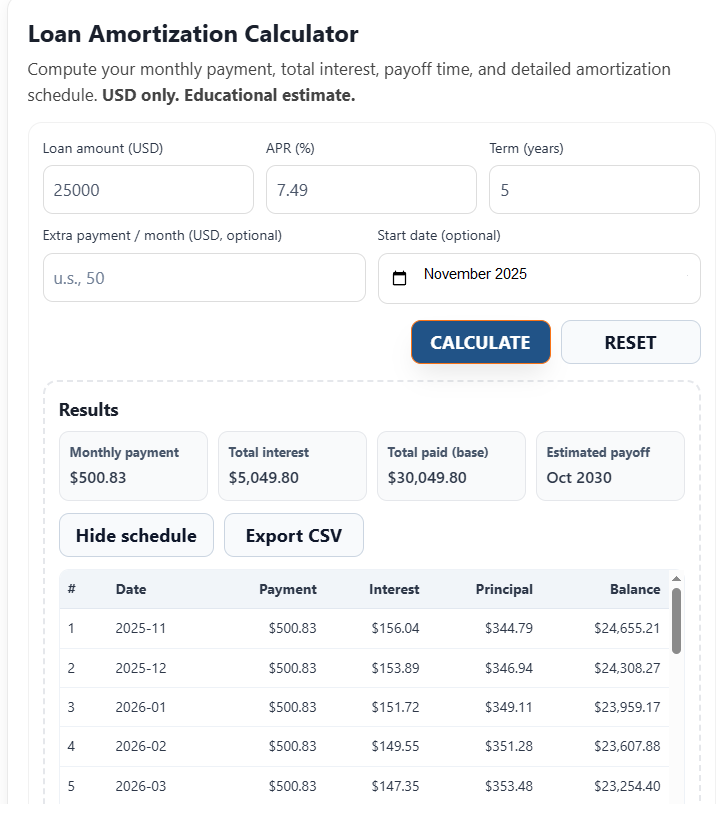 Example: $25,000 @ 7.49% APR over 60 months → $500.83/mo, $5,049.80 interest, payoff by October 2030. Export the amortization schedule to Excel or CSV.
Want to see how extra payments change this? Try adding $50/month — you’ll cut interest to about $4,486 and finish ~6 months earlier.
Example B – Same Loan + $50 Extra per Month
Here’s the same loan, but with an extra payment of $50 added every month. This illustrates how small extra amounts accelerate payoff and reduce total interest.
- Loan: $25,000 @ 7.49% APR, 5 years (Start date: November 2025)
- Monthly paid: $500.83 base + $50 extra = $550.83
- Estimated payoff: ~ April 2030 (≈ 6 months earlier than no-extra)
- Total interest: ≈ $4,486.22 (about $563.58 less vs. $5,049.80 without extra)
Why it works: the extra $50 goes straight to principal each month. That lowers the balance faster, so next month’s interest is calculated on a smaller amount—compounding the savings and shortening the schedule.
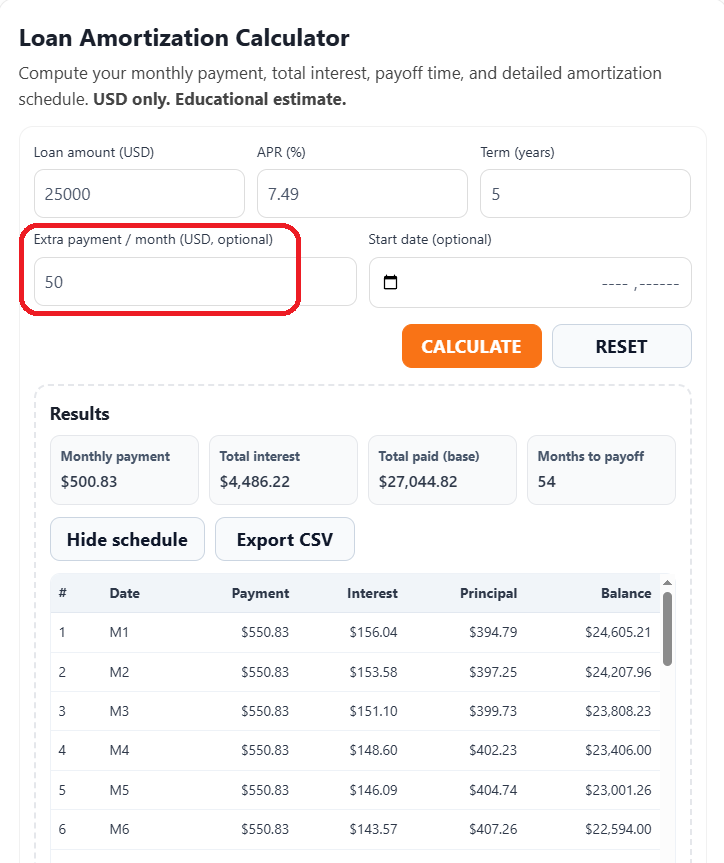 With $50 extra each month: payoff ~April 2030 and total interest ≈ $4,486.22 — about $563.58 less than the no-extra scenario.
No Extra
- Monthly: $500.83
- Total interest: $5,049.80
- Estimated payoff: Oct 2030
+$50 Extra
- Monthly paid: $550.83
- Total interest: ≈ $4,486.22
- Estimated payoff: ~ Apr 2030
You can export the amortization schedule Excel for either scenario (CSV) to track progress in Excel or Google Sheets.
Comparing Different Loan Types
While all loans follow the same basic amortization principle — a mix of interest and principal in every payment — the details vary greatly by loan type.
Understanding how amortization behaves for personal, student, auto, and home loans helps you make smarter borrowing decisions.
Personal Loan Amortization
Personal loans usually have short repayment terms (2–5 years) and higher interest rates than secured loans.
Payments are fixed, and the balance declines quickly, making a personal loan amortization calculator helpful for planning monthly budgets and comparing different APR offers.
Student Loan Amortization
Student loans often follow long repayment schedules (10–25 years).
Some are subsidized, meaning interest may not accrue while you’re in school.
Federal loans also allow income-based repayment, where your payment adjusts with your income, but the underlying schedule still follows an amortization calculator for student loan model.
Auto Loan Amortization
Auto loans are typically short- to medium-term (3–7 years) with fixed interest rates and predictable payments.
Since vehicles depreciate quickly, it’s important that the loan balance amortizes faster than the car loses value — which is why an auto loan amortization calculator is essential before financing.
Mortgage Amortization
Mortgages stretch over much longer periods — often 15 or 30 years.
Early payments are mostly interest, with principal reduction accelerating in later years.
A home amortization calculator or amortization calculator mortgage helps homeowners estimate total interest costs, track equity growth, and explore options like refinancing or extra payments.
Each loan type has its own rhythm of repayment, but the goal remains the same: understanding your amortization schedule helps you manage debt efficiently and pay off faster.
How Extra Payments Impact Your Loan
Even small extra amounts can shorten your payoff and cut interest substantially. Here’s the idea using the same
$25,000 @ 7.49% APR, 5-year example you just saw.
No Extra
- Monthly: $500.83
- Total interest: $5,049.80
- Estimated payoff: Oct 2030
+$50 Extra / month
- Monthly paid: $550.83
- Total interest: ≈ $4,486.22
- Estimated payoff: ~ Apr 2030
Savings: ≈ $563.58 interest and ~6 months sooner.
Extra dollars go directly to principal. Next month, interest is calculated on a smaller balance, so more of each payment
shifts to principal—compounding the time and interest savings.
Biweekly vs. Monthly
- Biweekly payments: 26 half-payments ≈ 13 full payments per year → effectively one extra monthly payment annually.
- Result: shorter payoff and lower total interest (impact varies by term and rate).
How to do this in the tool
- Enter loan amount, APR, term.
- In Extra payment / month, try values like $25, $50, or $100.
- Compare Total Interest and Payoff date; export the schedule to Excel/CSV to track progress.
Pro tip: If your lender allows it, mark extra payments as “principal only” to ensure they reduce balance immediately.
How to Build a Loan Amortization Table in Excel
Want to create your own loan amortization schedule Excel? You can easily build one using basic formulas in a spreadsheet like Excel or Google Sheets.
This quick guide explains the logic step by step and shows how it connects with results from our amortizing loan calculator excel.
- Set up headers: In Row 1, type Month, Payment, Interest, Principal, Balance.
- Enter initial data: In Row 2, set your loan balance (e.g., 25000), APR (7.49%), and term (5 years = 60 months).
- Monthly Interest Rate:
=APR/12 - Payment Formula:
=PMT(APR/12,Term,−LoanAmount)→ result ≈ $500.83 for this example. - Interest each month:
=PreviousBalance * APR/12 - Principal:
=Payment − Interest - New Balance:
=OldBalance − Principal - Drag the formulas down through 60 rows to generate the full table.
For example:
Interest = Balance × Rate ÷ 12
Principal = Payment − Interest
New Balance = Old Balance − Principal
Once your table is built, you can compare it directly with the export from our loan amortization table calculator.
Just click “Export CSV” in the tool to download your data and verify your Excel formulas.
Building your own sheet gives you a hands-on understanding of how amortization works — and lets you test different rates, terms, or extra payments visually.
Frequently Asked Questions (FAQs)
1. What does a loan amortization table show?
A loan amortization table breaks down each monthly payment into two parts — interest and principal.
It also tracks how the outstanding balance decreases over time until the loan is fully paid off.
You can generate this full schedule instantly using our loan amortization table calculator.
2. How is amortization different from simple interest?
With amortization, each payment covers both interest and a portion of the loan balance, so the total interest paid decreases over time.
In a simple interest loan, interest is calculated only on the original principal and does not decline each month.
Most U.S. personal, auto, and home loans use the amortized model rather than a simple interest model.
3. Does amortization include taxes or insurance?
No — a loan amortization calculator focuses only on principal and interest.
Taxes, homeowner’s insurance, or escrow payments are separate and typically handled by your lender if included in your monthly mortgage payment.
The amortization schedule itself does not account for these.
4. How can I pay off a loan faster?
You can shorten your payoff period by adding small extra payments toward principal or switching to a biweekly payment plan.
Using the calculator, try adding $25–$100 to your monthly amount — you’ll immediately see how this reduces total interest and shortens your schedule.
This makes the tool function as a simple monthly amortization calculator for experimenting with early payoff strategies.
Related Tools
💰 Loan Payoff Calculator
See how lump-sum or extra payments shorten your term and reduce total interest.
📊 Loan Interest Calculator
Calculate APR, total interest, and monthly payments for any term.
🤝 Loan Comparison Calculator
Compare multiple loans side by side to find the lowest total cost.
📈 Inflation Calculator (1913–2026)
Track U.S. dollar value over time and adjust amounts for inflation.
Conclusion – Take Control of Your Loan
Smart borrowing starts with understanding how your loan really works.
Use this loan amortization calculator to plan payments, visualize your payoff schedule,
and experiment with extra contributions to see how they impact your total cost.
Download or export your amortization schedule to track progress each month.
Reviewing how much interest you’ve saved or how much principal you’ve reduced
can motivate you to stay consistent and reach financial freedom faster.
Remember — paying down debt isn’t just about the math, it’s about momentum.
Every extra payment counts toward your long-term stability.
Whether it’s your auto, student, or personal loan, these personal finance tools
help you stay proactive, organized, and confident about your financial future.
📚 Learn More from Official U.S. Resources:
- Consumer Financial Protection Bureau (CFPB) – Guides on early payoff, extra payments, and loan management.
- Federal Reserve – Credit & Loan Education – Understand interest, credit terms, and repayment options.
- Federal Student Aid – Loan Repayment Plans – Official repayment programs and calculators for student loans.
Ready to start? Use the calculator above to build your customized payoff schedule,
or explore our related free tools to compare loan types, credit options, and payoff timelines.
Similar Posts
home loan comparison
Home Loan Comparison — Find the Best Mortgage Rates & Lenders The U.S. housing market is constantly shifting, and a small change in interest rates — say 6% vs 7% — can mean thousands of dollars over the life of your…
Car Loan Payoff Calculator
Car Loan Payoff Calculator – Learn How to Save on Auto Loans Car loan payoff calculator guidance that shows you how to pay off a car loan early, cut interest, and shorten your term—whether your auto loan is for a new…
What Does APR Mean?
What Does APR Mean? You see APR on car loans, credit cards, mortgages—everywhere. If you’ve ever asked yourself, “what does APR mean?” here’s the simple answer: it’s the all-in yearly cost of borrowing, combining the interest rate plus most lender fees…
auto loan comparison calculator
Auto Loan Comparison Calculator | Compare Car Loans Side by Side A small change in APR, fees, or loan term can dramatically change both your monthly payment and your total cost. That’s why comparing car loans side by side is the…
how to pay off student loans fast ?
How to Pay Off Student Loans Fast | Proven Strategies + Payoff Calculator With interest rates fluctuating — and occasional concerns about federal government shutdowns — millions of Americans are asking a simple question: How can I get out of student…
Can I get 0% interest rate for a car loan?
Can I Get 0% Interest Rate for a Car Loan? (What It Means & How to Qualify) “0% APR financing” sounds like the perfect deal — buy a car and pay no interest at all. But the reality is, these offers…